

Memory Monitoring
Periodically capture memory usage of Android, iOS and Flutter apps to spot leaks and memory pressure.
Introduction
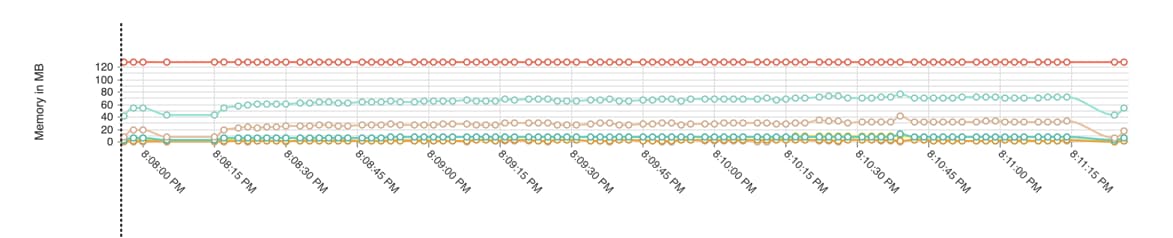
Measure automatically tracks memory usage for each session. Memory usage is shown along with the session timeline and can be used to identify memory leaks or excessive memory usage in your app.
Android
A worker thread reads the following properties every 2 seconds and reports them to Measure:
- Max heap size - The maximum amount of memory that the app can use. Collected using Runtime.maxMemory.
- Total heap size - The total amount of memory that the app is currently using. Collected using Runtime.totalMemory.
- Free heap size - The amount of memory that is currently free. Collected using Runtime.freeMemory.
- RSS (Resident set size) - The amount of memory that the app is currently using, including the memory used by the native code. Collected by reading the proc/pid/statm file.
- Total PSS (Proportional set size) - The total amount of memory that the app is currently using, including the memory used by the native code, but excluding the memory used by the system. Collected using Debug.getMemoryInfo.
- Native total heap size - The total amount of memory that the app is currently using for native code. Collected using Debug.getNativeHeapSize.
- Native free heap size - The amount of memory that is currently free for native code. Collected using Debug.getNativeFreeHeapSize.
iOS
Measure SDK calculates memory usage using the task_info API with the TASK_VM_INFO flavor. This API provides detailed
memory statistics for the app’s process. The SDK extracts the phys_footprint value, which represents the physical
memory footprint of the app. This value accounts for real memory pages in use, shared memory overhead and
compressed memory, making it an accurate measure of the app’s actual memory consumption.
If phys_footprint is unavailable, the SDK falls back to resident_size, which represents the resident memory size
allocated to the process. However, resident_size does not reflect memory compression or pressure, so it may
underreport actual memory usage compared to phys_footprint.
SDK falls back to resident_size in below cases:
- If
phys_footprintis zero or not available due to system constraints. - If the
task_infoAPI call fails (rare, but possible due to system restrictions or sand-boxing).

Impact on Dashboard Metrics
When phys_footprint is available, the reported memory usage reflects actual memory pressure.
When resident_size is used, the reported value may be lower than real usage since it excludes compressed memory.
The dashboard does not currently indicate when the SDK falls back to resident_size, but unusually low memory usage
readings may suggest this fallback occurred.
Further reading
Flutter
Memory usage is collected for Flutter apps based on the platform the app is running on (Android or iOS). The SDK uses the same methods as described above for Android and iOS.
React Native
Memory usage is collected for React Native apps based on the platform the app is running on (Android or iOS). The SDK uses the same methods as described above for Android and iOS.
Think this page can be better?
Open an issue