

Gesture Tracking
Automatically capture user gestures like taps, scrolls and long-presses alongside layout snapshots showing the UI that was acted on.
Overview
Measure SDK captures gestures like click, long click and scroll events automatically. These events make it easy to understand user interactions with your app without having to manually instrument every view. Additionally, a layout snapshot is captured at the time of the gesture, which helps in understanding the context of the gesture and the state of the UI at that moment.
Layout Snapshots
Layout snapshots provide a lightweight way to capture the structure of your UI at key user interactions. They are automatically collected during click events (with throttling) and store the layout hierarchy as a wireframe rather than full screenshots. This approach gives valuable context about the UI state during user interactions while being significantly more efficient to capture and store than traditional screenshots.
| Screenshot | Layout snapshot |
|---|---|
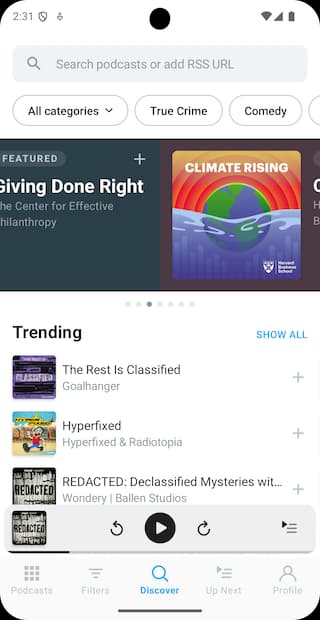 | 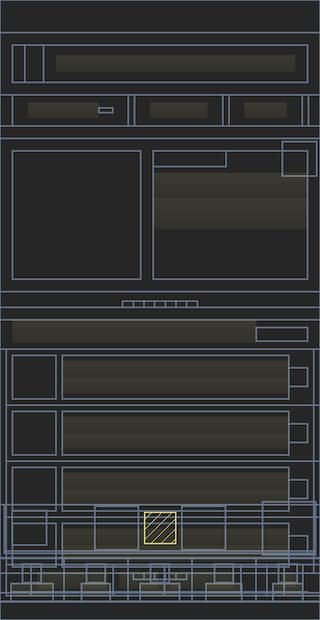 |
Layout snapshots are captured along with every gesture click event with throttling (750ms between consecutive snapshots). This ensures that you get a representative snapshot of the UI without overwhelming the system with too many images. The snapshots are stored in a compressed lightweight format, which is efficient for both storage and rendering.
Flutter
Layout snapshots are collected by default for Flutter applications. However, only the widgets shown in the table are used to build the layout snapshot. To make the layout snapshot more useful, you can use a build time script to also add any other widgets that are used in your application. See measure_build package for more details.
| Default Widget Types |
|---|
FilledButton |
OutlinedButton |
TextButton |
ElevatedButton |
CupertinoButton |
ButtonStyleButton |
MaterialButton |
IconButton |
FloatingActionButton |
ListTile |
PopupMenuButton |
PopupMenuItem |
DropdownButton |
DropdownMenuItem |
ExpansionTile |
Card |
Scaffold |
CupertinoPageScaffold |
MaterialApp |
CupertinoApp |
Container |
Row |
Column |
ListView |
PageView |
SingleChildScrollView |
ScrollView |
Text |
RichText |
How it works
Android
When Measure SDK is initialized, it registers a touch event interceptor using the Curtains library. It allows Measure to intercept every touch event in an application and process it.
There are two main parts to tracking gestures:
Gesture detection
Measure tracks the time between ACTION_DOWN and ACTION_UP events and the distance moved to classify a touch as
click, long click or scroll.
A gesture is classified as a long click gesture if the time interval between ACTION_DOWN and ACTION_UP is more
than ViewConfiguration.getLongPressTimeout
time and the distance moved by the pointer between the two events is
less
than ViewConfiguration.get.getScaledTouchSlop.
A gesture is classified as a click if the distance moved by the pointer between the two events is less than ViewConfiguration.get.getScaledTouchSlop but the time interval between the two events is less than ViewConfiguration.getLongPressTimeout().
A gesture is classified as a scroll if the distance moved by the pointer between the two events is more than ViewConfiguration.get.scaledTouchSlop. An estimation of direction in which the scroll happened based on the pointer movement.
For compose, a click/long click is detected by traversing the semantics tree using SemanticsOwner.getAllSemanticsNodes and finding a composable at the point where the touch happened and checking for Semantics Properties - SemanticsActions.OnClick, SemanticsActions.OnLongClick and SemanticsActions.ScrollBy for click, long click and scroll respectively.
Compose currently reports the target_id in the collected data using testTag,
if it is set. While the target is always reported as AndroidComposeView.
Gesture target detection
Along with the type of gesture which occurred, Measure can also estimate the target view/composable on which the gesture was performed on.
For a click/long click, a hit test is performed to check the views which are under the point where the touch occurred. A traversal is performed on the children of the view group found and is checked for any view which has either isClickable or isPressed set to true. If one is found, it is returned as the target, otherwise, the touch is discarded as can be classified as a "dead click".
Similarly, for a scroll, after the hit test, a traversal is performed for any view which has isScrollContainer set to true and canScrollVertically or canScrollHorizontally. If a view which satisfies this condition it is returned as the target, otherwise, the scroll is discarded and can be classified as a "dead scroll".
Gesture tracking consists of two main components:
iOS
Gesture detection
Measure SDK detects touch events by swizzling UIWindow's sendEvent method. It processes touch events to classify
them into different gesture types:
- Click: A touch event that lasts for less than 500 ms.
- Long Click: A touch event that lasts for more than 500 ms.
- Scroll: A touch movement exceeding 3.5 points in any direction.
Gesture target detection
Gesture target detection identifies the UI element interacted with during a gesture. It first determines the view at the
touch location and then searches its subviews to find the most relevant target. For scroll detection, it checks if the
interacted element is a scrollable view like UIScrollView, UIDatePicker or UIPickerView.
Flutter
Gesture detection
Measure SDK detects touch events by listening to pointer events
from Listener widget, which is
added to the root widget of the app using MeasureWidget.
It processes touch events to classify them into different gesture types:
- Click: A touch event that lasts for less than 500 ms.
- Long Click: A touch event that lasts for more than 500 ms.
- Scroll: A touch movement exceeding 20 pixels in any direction.
Gesture target detection
The SDK automatically identifies gesture targets by traversing the widget tree and checking if widgets at the touch position are interactive. For clicks and long clicks, it searches for clickable widgets, while for scrolls, it looks for scrollable widgets.
Any widget not listed in the tables below will not be automatically tracked for gestures. For custom widgets or unsupported widget types, gestures will not be detected unless they inherit from or contain one of the supported widget types.
Supported Clickable Widgets:
| Widget Type |
|---|
ButtonStyleButton |
MaterialButton |
IconButton |
FloatingActionButton |
CupertinoButton |
ListTile |
PopupMenuButton |
PopupMenuItem |
DropdownButton |
DropdownMenuItem |
ExpansionTile |
Card |
GestureDetector |
InputChip |
ActionChip |
FilterChip |
ChoiceChip |
Checkbox |
Switch |
Radio |
CupertinoSwitch |
CheckboxListTile |
SwitchListTile |
RadioListTile |
TextField |
TextFormField |
CupertinoTextField |
Stepper |
Supported Scrollable Widgets:
| Widget Type |
|---|
ListView |
ScrollView |
PageView |
SingleChildScrollView |
Layout snapshots
Layout snapshots capture your app's UI structure by traversing the widget tree from the root widget. The SDK collects key information about each widget—including its type, position, size and hierarchy—to build a lightweight representation of your UI.
The entire layout snapshot is generated in a single pass through the widget tree using the visitChildElements method.
Since a typical Flutter screen can contain thousands of widgets, the snapshot is optimized to include only relevant
widget types to maintain performance and clarity.
To include custom widgets or additional widget types in your snapshots, use the measure_build package to generate a comprehensive list of all widget types used in your app.
React Native
Gesture detection for React Native apps are based on the platform the app is running on (Android or iOS). The SDK uses the same methods as described above for Android and iOS.
Benchmark results
Android
Checkout the results from a macro benchmark we ran for gesture target detection here. TLDR;
- On average, it takes 0.458 ms to find the clicked view in a deep view hierarchy.
- On average, it takes 0.658 ms to find the clicked composable in a deep composable hierarchy.
iOS
- On average, it takes 4 ms to identify the clicked view in a view hierarchy with a depth of 1,500.
- For more common scenarios, a view hierarchy with a depth of 20 takes approximately 0.2 ms.
Flutter
- On average, it takes 3ms to generate a layout snapshot and identify the clicked widget in a widget tree with a depth of 50 widgets.
- The time to generate the layout snapshot increases linearly with the depth of the widget tree.
- The benchmark tests can be found in Layout Snapshot Perf Tests.
Flutter
- On average, it takes 10ms to generate a layout snapshot and identify the clicked widget in a widget tree with a depth of 100 widgets.
- The time to generate the layout snapshot increases linearly with the depth of the widget tree.
- The benchmark tests can be found here.
Think this page can be better?
Open an issueTrack errors
Track handled exceptions in your mobile app — issues that don't crash but still affect users. Android, iOS, Flutter and React Native APIs.
Performance Tracing
Trace any operation in your mobile app — API calls, DB queries, custom user flows — with nested spans, attributes and automatic screen load traces.