

Layout snapshots
Capture a lightweight wireframe of the screen with every tap to see the UI a gesture acted on.
Measure captures a layout snapshot with every click: a wireframe of the screen at the moment of the gesture. A snapshot shows what the user was acting on at a fraction of the cost of capturing, storing, and rendering a screenshot.
| Screenshot | Layout snapshot |
|---|---|
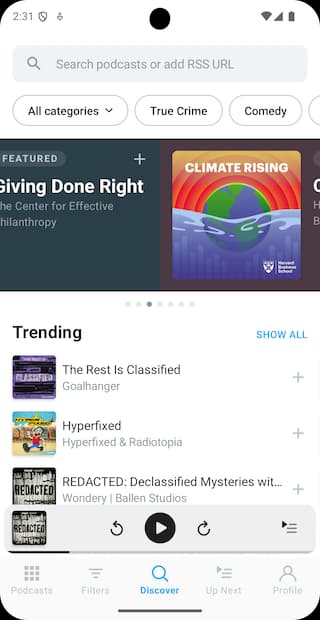 | 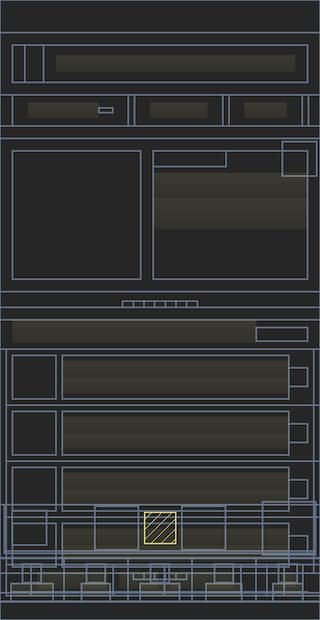 |
Snapshots are throttled to at most one every 750 ms, so bursts of taps don't add overhead.
Android
Snapshots cover the whole screen with no setup, whether it's built with Views, Jetpack Compose, or a mix of both.
iOS
Snapshots capture the full view hierarchy of the screen with no setup. SwiftUI content appears with its underlying system view names rather than your SwiftUI view names.
Flutter
A screen can hold thousands of widgets, so snapshots include only common widget types by default and skip the rest:
| Category | Widgets |
|---|---|
| Buttons | FilledButton, OutlinedButton, TextButton, ElevatedButton, CupertinoButton, ButtonStyleButton, MaterialButton, IconButton, FloatingActionButton |
| Menus and lists | ListTile, PopupMenuButton, PopupMenuItem, DropdownButton, DropdownMenuItem, ExpansionTile |
| Structure | Scaffold, CupertinoPageScaffold, MaterialApp, CupertinoApp, Container, Row, Column, Card |
| Scrolling | ListView, PageView, SingleChildScrollView, ScrollView |
| Text | Text, RichText |
Include your own widgets
If your app is built from custom widgets, the default list won't say much about your UI. The measure_build package scans your project and generates a map of every widget type your code declares or uses, including widgets from packages you depend on, so snapshots show your real widget names. Private widgets (names starting with _) are left out.
-
Add the dev dependencies in
pubspec.yaml:dev_dependencies: measure_build: ^0.1.0 build_runner: ^2.4.0 -
Generate the widget map:
dart run build_runner buildThis writes
lib/msr_widgets.g.dartcontaining a map namedwidgetFilter. Re-run it after adding new widget types, or usedart run build_runner watchto regenerate on every change. -
Pass the map to the SDK during initialization:
import 'package:measure_flutter/measure_flutter.dart';
import 'package:your_app/msr_widgets.g.dart';

Future<void> main() async {
  await Measure.instance.init(
    () => runApp(MeasureWidget(child: MyApp())),
    config: const MeasureConfig(widgetFilter: widgetFilter),
  );
}
Configuration
The generator works without configuration. To change its defaults, configure it in your app's build.yaml:
targets:
  $default:
    builders:
      measure_build|widget_analyzer:
        options:
          output_path: lib/src/msr_widgets.g.dart
          scan_directories:
            - lib
            - custom_widgets
variable_name: msrWidgetFilteroutput_pathsets where the generated file is written. Defaults tolib/msr_widgets.g.dart.scan_directorieslists the directories scanned for widgets. Defaults tolib; add entries if widget code lives elsewhere.variable_namenames the generated map. Defaults towidgetFilter.
React Native
Snapshots are generated by the native SDK for the platform the app runs on, so the Android and iOS behavior applies as is.
Performance
See Performance Impact for the full benchmark setup.
Android
Detecting and creating a snapshot adds 0.6 ms to 1 ms per click.
iOS
Capturing the layout hierarchy takes 7.5 ms at the 95th percentile, measured on an iPhone 14 Plus.
Flutter
Generating a snapshot and finding the tapped widget takes about 3 ms in a widget tree 50 levels deep, and the time grows linearly with depth (benchmarks).
Think this page can be better?
Open an issue