



SIGSEGV crashes on Android: how GWP-ASan finds native memory bugs
Why native memory bugs like use after free and buffer overflow cause SIGSEGV crashes on Android, how GWP-ASan detects them, and how to read a GWP-ASan tombstone.

Abhay Sood
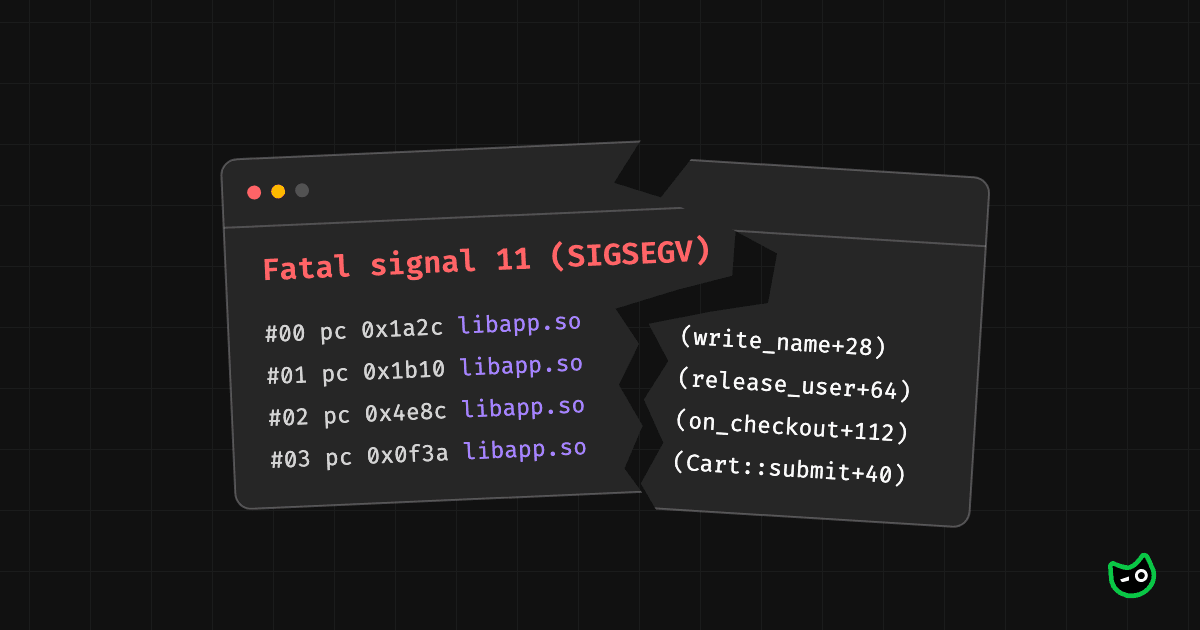
When native code crashes on Android, it doesn't throw an exception the way Kotlin or Java code does. The system kills the app with a signal instead. Two common ones are Fatal signal 11 (SIGSEGV) and Fatal signal 6 (SIGABRT). This article is mainly about SIGSEGV, which happens when the code tries to read or write memory it isn't allowed to touch.
When Android receives this signal, it writes a diagnostic file called a tombstone. You can think of it as a crash report. It has the signal and the stack trace of the thread that crashed. In release builds, native libraries are usually stripped of debug symbols. So the stack trace shows memory addresses instead of function names and line numbers. You need to symbolicate it with the unstripped libraries from your build.
How memory bugs in C and C++ cause SIGSEGV crashes
If you mostly write Kotlin, here is a quick refresher on how you work with memory in C and C++, where there is no garbage collector. When you need memory, like when you'd create an object in Kotlin, you ask for it with malloc. When you're done with it, you have to give it back yourself with free.
Once you free memory, malloc can give it to another part of your code. Your old pointer still points to it, and nothing stops you from writing through it. This is called a use after free.
char *p = malloc(32);
free(p);

char *q = malloc(32);  // can get the same memory
p[0] = 'x';            // writes into q
A buffer overflow does the same kind of damage. That is when you write past the end of the memory you asked for, into the memory next to it. Either way, you end up overwriting memory that other code is using.
The app usually doesn't crash at this point and keeps running. Later, the other code reads that memory and gets the wrong data. Say it had stored a pointer there, and that pointer is now garbage. When the code follows the pointer, it lands on memory it isn't allowed to touch, and the app crashes with SIGSEGV. Whether it crashes at all depends on what else the app allocated in between, so these crashes are hard to reproduce. The tombstone only has the stack trace from that moment. It doesn't show the code that actually corrupted the memory earlier.
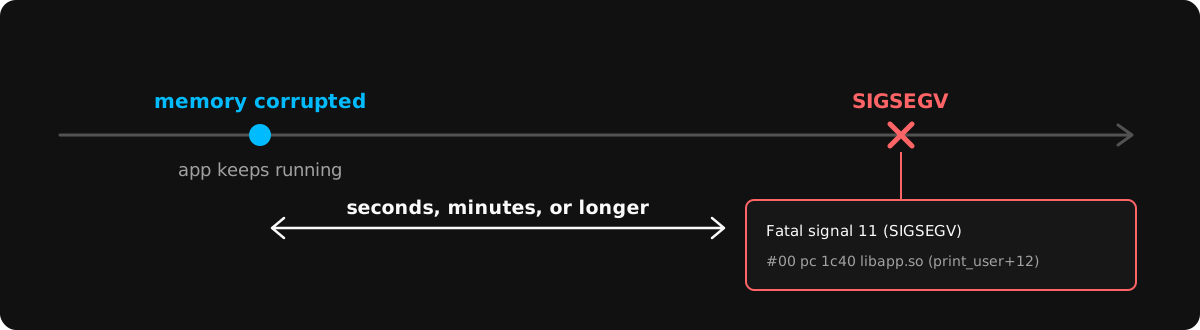
GWP-ASan is a memory error detector built into Android. It catches the bad read or write itself, so the tombstone has the stack trace of the code with the bug.
Next, we'll look at how GWP-ASan works and which errors it catches. Then we'll learn how to read its crash reports.
What is GWP-ASan and how does it work?
GWP-ASan is a sampling memory error detector in Android's native allocator. It catches heap memory bugs on the bad access itself instead of somewhere later.
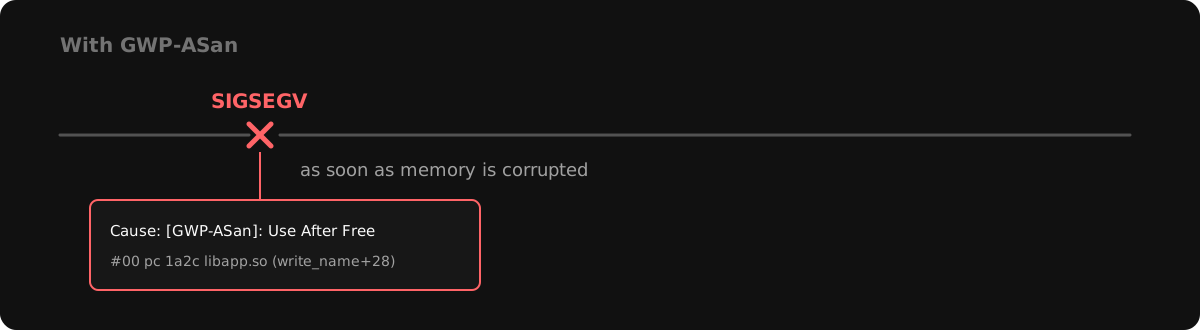
GWP-ASan only does this for a small, random sample of allocations. That keeps the cost low enough to run in production.
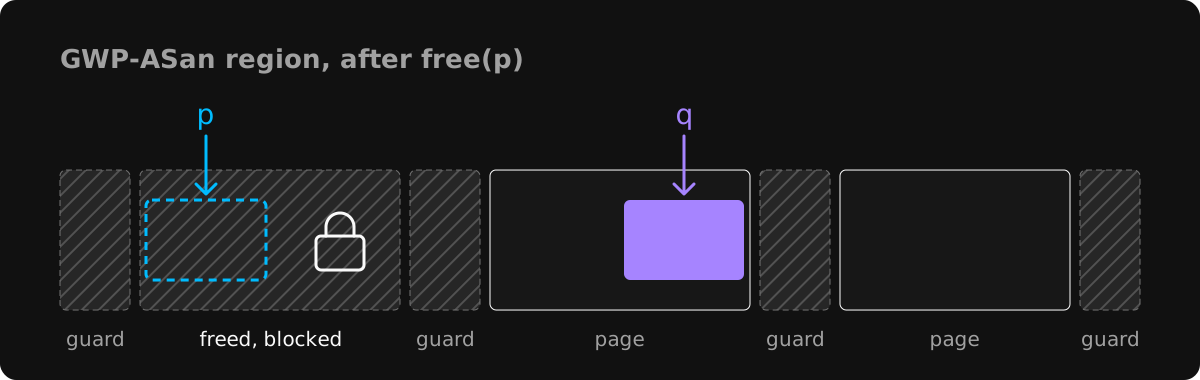
When the app starts, GWP-ASan reserves a small region of memory that is separate from the normal heap. It splits this region into slots, and each slot is a page of memory that can hold one allocation. Between every two slots is a guard page. Reading from or writing to a guard page causes a SIGSEGV.
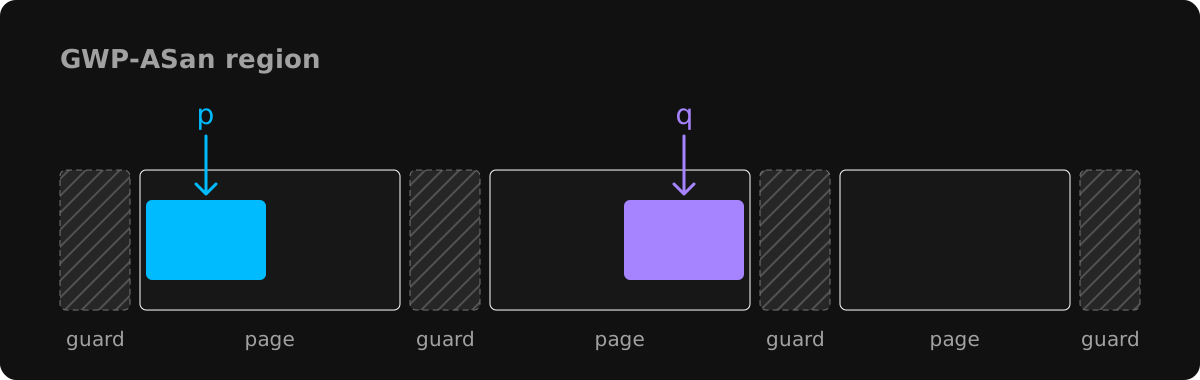
Once in a while, malloc picks an allocation at random and puts it in one of these slots instead of the normal heap. When that happens:
- The allocation sits right next to the guard page on one side of the slot, picked at random.
- GWP-ASan saves the stack trace of where it was allocated.
- When the app frees it, GWP-ASan saves the stack trace of where it was freed.
- GWP-ASan then removes the app's permission to read or write the slot, just like a guard page. If any code still uses the old pointer, GWP-ASan catches it right there. The slot stays like this for a while before GWP-ASan puts a new allocation in it.
Which memory errors can GWP-ASan detect?
Guard pages and freed slots let GWP-ASan catch five kinds of memory errors.
| Error | What goes wrong | How GWP-ASan catches it |
|---|---|---|
| Use after free | Memory is used after it was freed | The page is blocked when the memory is freed, so the next access is caught |
| Buffer overflow | Code writes past the end of a buffer | If a guard page sits right after the buffer, the write is caught |
| Buffer underflow | Code writes before the start of a buffer | If a guard page sits right before the buffer, the write is caught |
| Double free | The same memory is freed twice | It sees that the memory was already freed |
| Invalid free | free() gets a pointer that isn't the start of an allocation | It sees that the pointer doesn't match where the allocation starts |
1. Use after free
A use after free happens when code frees memory but keeps the pointer, and later reads or writes through it.
char *buf = malloc(32);
free(buf);
buf[0] = 'A';  // buf was already freed
In real code, the free and the use are usually far apart. One object frees a buffer while another object still holds a pointer to it. Or a callback runs after the object it uses was destroyed. By then, malloc may have given that memory to other code, and the write changes that code's data.
If GWP-ASan picked this allocation, its slot can't be read or written after free. So GWP-ASan catches the write right away. The report shows where the memory was freed and where it was used after that.
2. Buffer overflow
A buffer overflow happens when code writes past the end of a buffer.
char *buf = malloc(32);
buf[32] = 'A';  // the last valid index is 31
It is often an off-by-one mistake in a loop. It also happens when code copies a string into a buffer that is too small for it. The extra bytes go into the memory right after the buffer, which usually belongs to another object.
If GWP-ASan places the buffer at the end of its slot, the write past the end lands in the guard page and GWP-ASan catches it right away. GWP-ASan rounds allocation sizes up a little for alignment. So there can be a few bytes between the end of the buffer and the guard page. An overflow of a byte or two can land in that gap and not be caught.
3. Buffer underflow
A buffer underflow happens when code writes before the start of a buffer.
char *buf = malloc(32);
buf[-1] = 'A';  // one byte before the buffer
This usually comes from an index that goes negative. For example, code walks backwards through a buffer and goes one step too far.
GWP-ASan catches it when the buffer sits at the start of its slot, right after a guard page. Each buffer is placed at one end of its slot at random. So an overflow or an underflow is caught in about half of the sampled allocations. A bug that happens often still gets caught after a few samples.
4. Double free
A double free happens when code frees the same memory twice.
char *buf = malloc(32);
free(buf);
free(buf);  // freed again
This usually means two parts of the code both think they own the memory, and both free it. On Android 11 and later, the allocator usually notices the second free and aborts the app right away. But the crash only shows the second free, not where the memory was freed the first time.
GWP-ASan keeps track of every allocation in its slots. When free is called on one that is already freed, it reports a double free. In the report, the stack trace under deallocated by is the first free, and the main backtrace is the second one.
5. Invalid free
An invalid free happens when code passes free a pointer that didn't come from malloc. A common case is a pointer into the middle of a buffer.
char *buf = malloc(32);
free(buf + 8);  // not the start of the allocation
This can happen when code moves a pointer forward while reading through a buffer, and then frees the moved pointer instead of the original one.
GWP-ASan knows where each allocation in its slots starts. When free gets a pointer that doesn't match, it reports an invalid free. The report also shows how many bytes into the allocation the pointer was.
How to read a GWP-ASan report
When GWP-ASan catches an error, Android writes a tombstone like it does for any other native crash. The tombstone also has a Cause line and the stack traces of where the memory was allocated and freed. The examples below come from one tombstone for a use after free, shortened to the important lines.
Cause
signal 11 (SIGSEGV), code 2 (SEGV_ACCERR), fault addr 0x7a1c3f6fe0
Cause: [GWP-ASan]: Use After Free, 0 bytes into a 32-byte allocation at 0x7a1c3f6fe0
The first line is the same signal line you see for any SIGSEGV crash. The Cause line below it is added by GWP-ASan. It shows the type of memory error and where the bad access was inside the allocation. In this example, the code accessed the first byte of a 32-byte allocation after it was freed.
backtrace
backtrace:
  #00 pc 0000000000001a2c  /data/app/~~kQ3vXy==/com.example.app-Zp1sTw==/lib/arm64/libapp.so (write_name+28)
This is the stack trace of the bad access itself. In this example, write_name in libapp.so used the memory after it was freed.
deallocated by
deallocated by thread 8123:
  #00 pc 0000000000047c64  /apex/com.android.runtime/lib64/bionic/libc.so (gwp_asan::AllocationMetadata::CallSiteInfo::RecordBacktrace(unsigned long (*)(unsigned long*, unsigned long))+68)
  #01 pc 0000000000048388  /apex/com.android.runtime/lib64/bionic/libc.so (gwp_asan::GuardedPoolAllocator::deallocate(void*)+368)
  #02 pc 0000000000001b10  /data/app/~~kQ3vXy==/com.example.app-Zp1sTw==/lib/arm64/libapp.so (release_user+64)
This stack trace shows the code that freed the memory. In this example it is release_user. For a use after free or a double free, the fix usually goes here.
allocated by
allocated by thread 8123:
  #00 pc 0000000000047c64  /apex/com.android.runtime/lib64/bionic/libc.so (gwp_asan::AllocationMetadata::CallSiteInfo::RecordBacktrace(unsigned long (*)(unsigned long*, unsigned long))+68)
  #01 pc 0000000000048294  /apex/com.android.runtime/lib64/bionic/libc.so (gwp_asan::GuardedPoolAllocator::allocate(unsigned long, unsigned long)+1228)
  #02 pc 000000000003c298  /apex/com.android.runtime/lib64/bionic/libc.so (gwp_asan_malloc(unsigned long)+164)
  #03 pc 000000000003ccc4  /apex/com.android.runtime/lib64/bionic/libc.so (malloc+80)
  #04 pc 0000000000001c44  /data/app/~~kQ3vXy==/com.example.app-Zp1sTw==/lib/arm64/libapp.so (create_user+52)
This stack trace shows the code that allocated the memory. In this example it is create_user. It is useful when the memory is passed between different parts of the code, because it tells you which code created it.
The first frames in both deallocated by and allocated by are GWP-ASan's own code in libc.so. Skip them and start from the first frame in your own library.
What GWP-ASan can't catch
GWP-ASan is a sampling tool for heap memory, so it has limits:
- By default, only about 1 in 2,500 allocations is sampled. A single test run will rarely catch a bug, but across many users in production it eventually will.
- Only memory from
mallocandnewis covered. If your code or a library uses its own allocator or memory pool, GWP-ASan can't catch bugs in that memory. - Stack and global memory aren't covered. Null pointer dereferences, stack corruption, and aborts are separate kinds of native crashes with their own causes.
How to turn on GWP-ASan in your app
Starting with Android 14, you don't need to do anything to turn GWP-ASan on. Android turns it on for every app by default, on about 1% of app launches.
In this default setup, GWP-ASan runs in recoverable mode. When it catches a memory bug, it doesn't crash the app. It writes a tombstone with the details of the bug, and the app keeps running. You can still read that tombstone later through ApplicationExitInfo, the same way you would for a crash.
To run GWP-ASan on every app launch, set android:gwpAsanMode="always" on the <application> tag in your manifest. This also turns it on for Android 11 to 13, where it is off by default.
<application
    android:gwpAsanMode="always"
    ... >
Whether the app crashes when GWP-ASan finds a bug depends on the Android version. On Android 11 to 14, the app crashes on the bad access. On Android 15 and later, GWP-ASan stays in recoverable mode and the app keeps running, even with always set.
Debugging native crashes with Measure
Measure reports native crashes on Android 12 and above. When the app crashes, Android saves a tombstone. The next time the user opens the app, Measure reads that tombstone and reports the crash as part of the session it happened in. For each crash, you can see how often it happens over time and which app versions or devices it affects. Crashes caught by GWP-ASan also show the memory error and where the memory was allocated and freed.
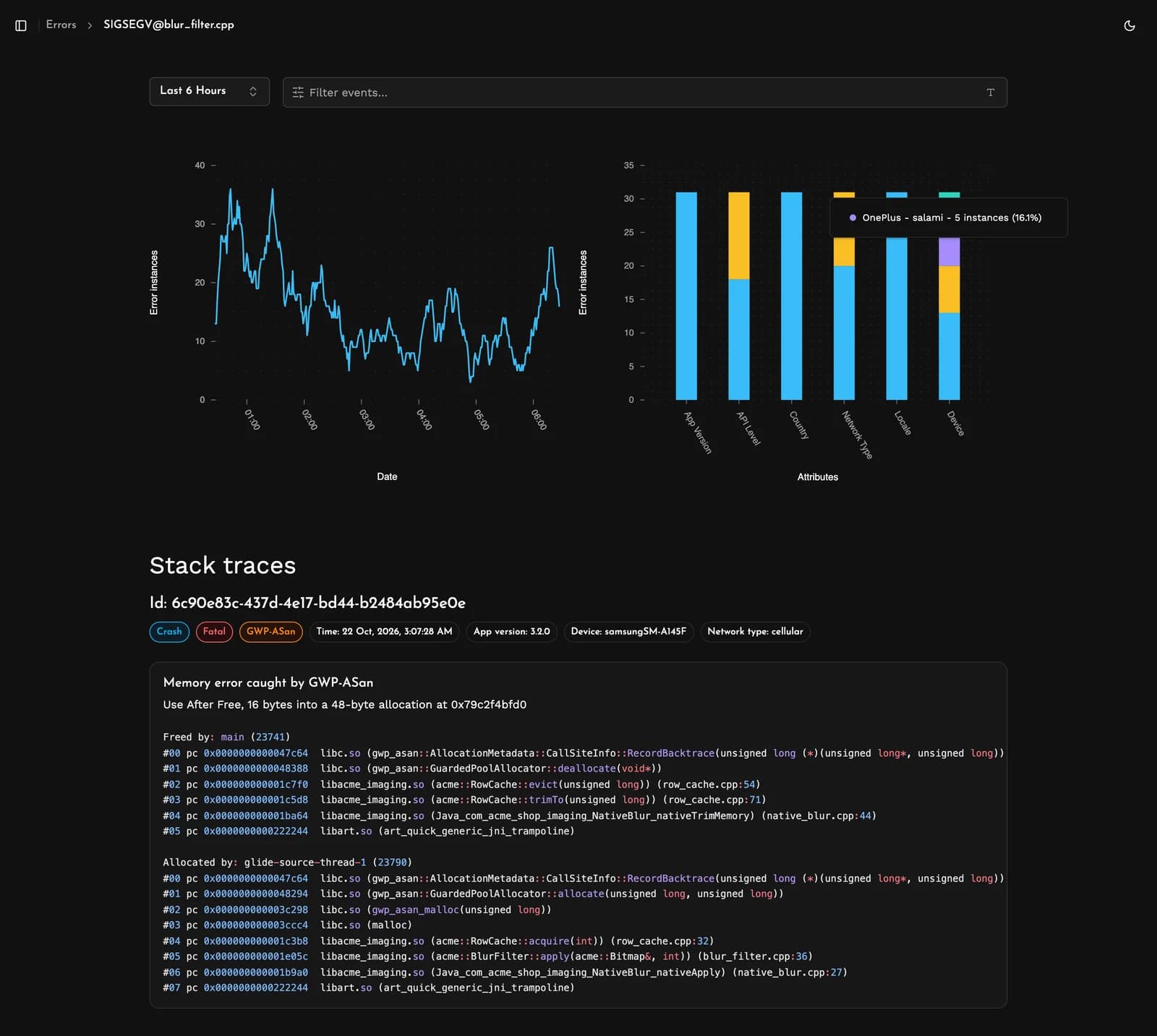
Not every memory error crashes the app. When GWP-ASan catches a bug in recoverable mode, the app keeps running, and Measure reports the bug as an unhandled error instead of a crash.
See what the user did before the crash
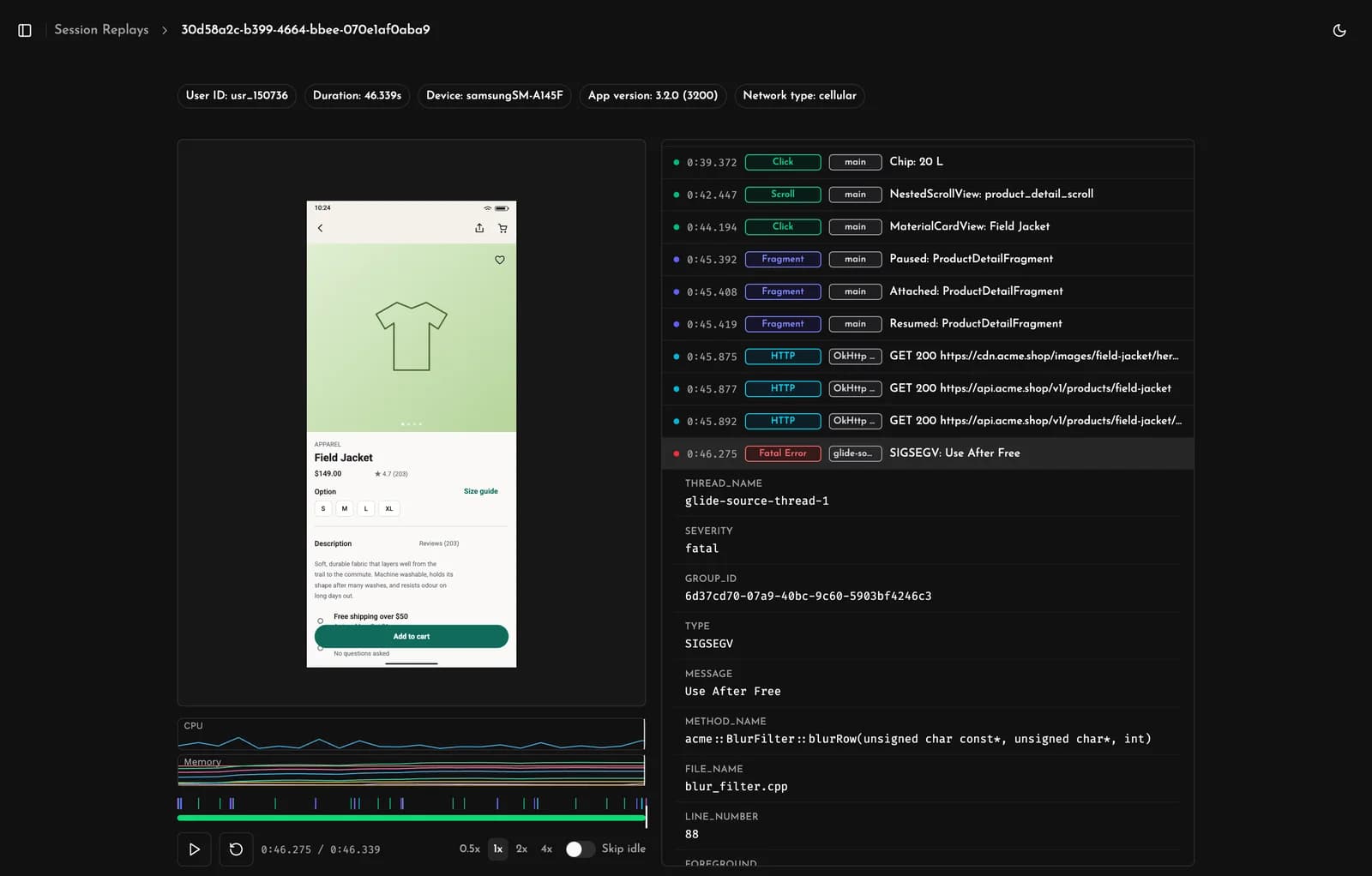
The stacks show which code freed the memory and which code used it after. They don't show what the user was doing, and you often need that to reproduce the bug.
Every crash links to its session. The session replay shows what happened in order: the screens the user opened, what they tapped, and the network requests the app made, up to the crash. In this example, the user opened a product, the app loaded its image, and the app crashed while blurring that image.
Find what the crashed sessions have in common
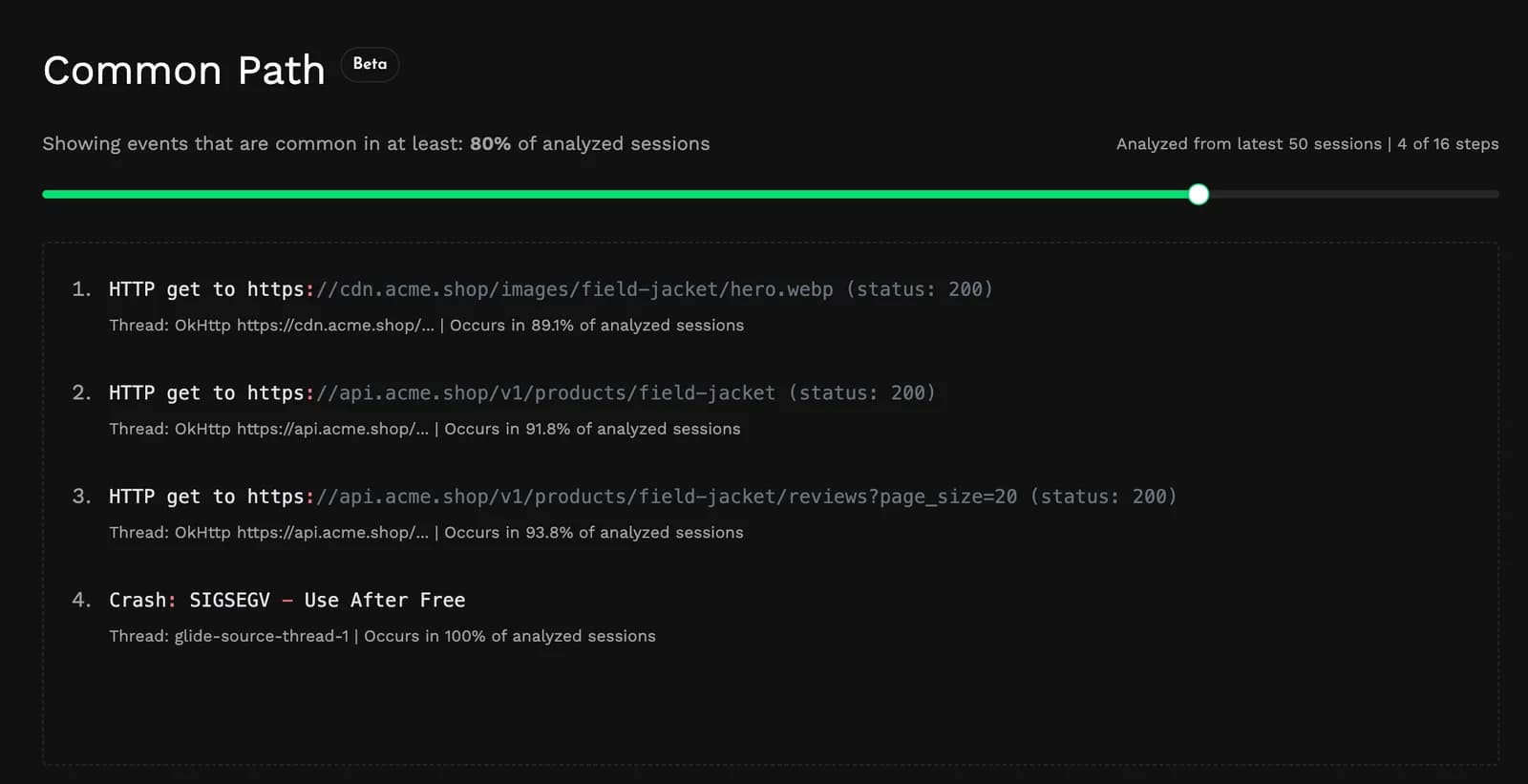
One session shows one way to hit the crash. To find a pattern, Measure looks at the latest sessions with the same crash and lists the steps most of them have in common. Use the slider to choose how common a step has to be.
In this example, almost every crashed session loaded a product image right before the crash. So the bug is likely in the code that blurs that image. The allocated by stack trace in the GWP-ASan report points to the same code.
To set up native crash reporting with Measure, follow the native crash reporting docs.
FAQs
What does "Fatal signal 11 (SIGSEGV)" mean on Android?
SIGSEGV stands for segmentation fault. It means native code tried to read or write memory it isn't allowed to access. This happens when the address isn't mapped, or when the code writes to read-only memory. The kernel then kills the app with signal 11.
The most common causes are:
- Reading or writing through a null pointer.
- Using memory after it was freed.
- Writing past the end of a buffer.
What's the difference between SIGSEGV and SIGABRT?
The kernel sends SIGSEGV when native code accesses memory it isn't allowed to. The stack trace shows the code that made the bad access.
The app raises SIGABRT itself when native code calls abort(). Code does this when a check fails, like an assert or a C++ exception that nothing catches. The memory allocator also aborts when it finds a double free or corrupted heap data. In that case, the bug happened earlier in a different part of the code.
Is GWP-ASan enabled by default?
Yes, on Android 14 and later, but only on about 1% of app launches and in recoverable mode. In this mode, GWP-ASan writes a tombstone and the app keeps running. To run it on every launch, see how to turn on GWP-ASan in your app.